


Teuida: Learn Languages
4.72.44K Reviews
App Specs
- Version
- 1.22.11
- Updated On
- License
- Free
- Downloads
- 1,000,000+
- Developer
- Teuida inc
- Categories
- Education
- Platform
- Android
Screenshots



 Analysis by AppCompare
When I open Teuida: Learn Languages for the first time, I’d set one modest goal: get comfortable saying a useful line aloud, not become fluent in a week. This is a speaking-focused education app from Teuida inc, built around conversational practice for beginners. That emphasis makes it feel different from a course that starts with long vocabulary lists: the point is to try language in context, even if your first attempt is hesitant.
It is free to install, with optional in-app purchases ranging from $4.99 to $79.99 per item. The app is rated for Everyone, has a 4.6 average from around 39,000 ratings, and has been installed over a million times. Those figures suggest a sizable audience, but what matters more to me is whether the lesson style fits your routine. If you want a low-pressure way to start speaking, it is worth exploring; if you mainly want grammar explanations or a broad reference dictionary, you may want another tool alongside it.
Getting Started with Teuida
First things first, downloading Teuida is a breeze. It’s available for Android and iOS, so no worries about compatibility here! Once you’ve got it installed, you’ll be greeted with a clean and intuitive interface. I mean, who doesn’t love an app that doesn’t make you feel like you’re trying to solve a Rubik’s cube just to find the settings?
The app kicks things off by asking you to pick the language you’re interested in. Currently, they’ve got Korean, Japanese, and Spanish, which are pretty hot choices if you ask me. I decided to give Korean a whirl because, well, I’ve always wanted to understand K-dramas without the subtitles. You with me?
Interactive Learning Experience
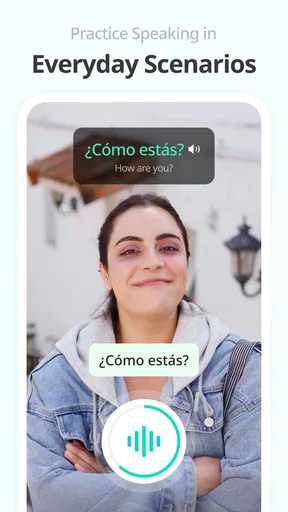
Okay, so the way Teuida structures its lessons is pretty darn cool. Instead of the usual flashcards and repetitive drills, it throws you into real-life scenarios. Imagine this: You’re at a café, and you need to order a latte. The app guides you through the conversation, teaching you phrases you’ll actually use. It’s like having a mini role-play session on your phone!
One of the features I absolutely loved is the voice recognition. It’s not just about reading and listening; you actually get to speak. The app listens and gives feedback on your pronunciation. It’s like having a patient language buddy who doesn’t mind if you butcher a word or two initially.
Make the First Practice Feel Manageable
For a first session, I’d choose a quiet moment and say each prompt at a natural pace rather than racing through it. Speaking into a phone can feel awkward, especially if you’re used to silent study, but treating the exercise like a tiny rehearsal helps. If a line goes poorly, repeat it and listen for the part that feels difficult; the useful win is noticing what to work on, not producing a perfect accent immediately.
Worth Reading Before You Choose

EA SPORTS FC Mobile 26 Is a Bigger Football Game, but It Takes Time

Flipboard Shows What News Apps Must Do Beyond the Feed

Switching to Android Auto Means Rethinking Your Driving Routine

Google Calendar Makes a Crowded Week Easier to Manage

Ludo King Makes the Most of the Minutes Between Plans

Baby Panda World Brings Quick Play to Modern Phones, but Its Game Library Feels Busy
A practical routine is to finish one short practice when you have a few spare minutes, then revisit the same kind of phrase later in the day without looking at it first. That small recall test shows whether you can retrieve the wording, not just recognize it while the app displays it. I’d keep a simple note of phrases I want to use in real life, such as a greeting or a request, and bring those back to mind before the next session.
Where Speaking Practice Helps Most
The role-play format is especially useful when you know what you want to say but freeze at the moment of speaking. Imagine preparing for a trip: you could use a café-style exchange as a rehearsal for ordering, then try saying the key phrase again later while walking or waiting for a bus. It won’t replace interacting with a person, but it can make the first real exchange feel less unfamiliar.
It can also suit someone learning for family or personal reasons, where the immediate goal is a handful of everyday conversations rather than a certificate. The key trade-off is that speaking scenarios are not the same as a complete language curriculum. If you need detailed grammar instruction, extensive reading practice, or a searchable word reference, use a dedicated resource for those tasks and treat this app as your speaking companion.
Motivation and Progress
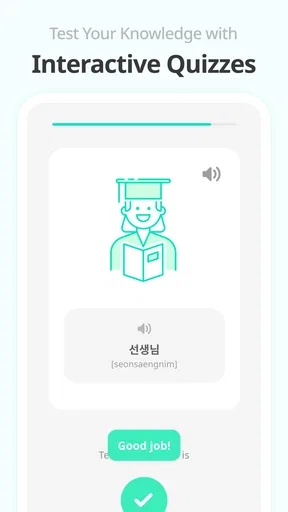
Now, let’s talk about keeping that motivation up. Teuida keeps you on your toes with achievements and progress tracking. There’s something oddly satisfying about seeing those little milestones light up. It’s like the app is giving you a high-five every time you complete a lesson. And let’s be real, who doesn’t love a good high-five?
There’s also a leaderboard feature that lets you see how you’re stacking up against other learners. It’s friendly competition, and it adds that extra push to keep you coming back. I found myself wanting to squeeze in just one more lesson before bed, which says a lot because, honestly, I love my sleep.
Using Progress Without Letting It Take Over
Achievements can make a habit easier to maintain, but I wouldn’t use a leaderboard as a measure of actual speaking ability. It rewards visible activity, while real confidence grows from recalling phrases and adapting them when a conversation changes. If competition motivates you, enjoy it; if it makes practice feel like another obligation, ignore the comparison and choose a small personal target instead.
One useful way to get more from a lesson is to pause after completing it and summarize aloud what you can now say. That turns a finished activity into a quick check of your own memory. I’d also avoid doing a string of lessons while distracted: a shorter, attentive practice is more likely to help than tapping through just to keep a streak or improve a ranking.
Cultural Insights
Language learning isn’t just about words, it’s about culture too. Teuida does a great job of sprinkling in cultural tidbits throughout the lessons. Whether it’s explaining the nuances of Korean dining etiquette or the history behind certain phrases, these little nuggets make the learning experience richer and more engaging. Plus, it’s always fun to impress friends with random cultural facts, right?
What to Pair It With
Compared with flashcard-first language apps, this approach gives more attention to saying a phrase in a situation rather than memorizing isolated items. That is a meaningful advantage for a beginner who needs a nudge to speak. Flashcards may still be better for rapidly reviewing a large personal vocabulary, while a textbook or grammar-led course can explain why a sentence is formed a certain way. I see these as complementary tools, not direct substitutes.
For a balanced routine, I’d use the app to rehearse dialogue, keep a separate list of unfamiliar words, and occasionally check grammar in a resource designed to teach it explicitly. That division of labor avoids expecting a conversational practice app to answer every language question. It also makes the app’s strongest feature—active speaking—less likely to get buried under activities better handled elsewhere.
Common Friction for New Learners
Speaking recognition can be encouraging, but it may also feel fussy if you’re in a noisy place, mumbling, or unsure how a sound should be produced. I’d practice somewhere quiet and speak clearly, without turning the feedback into a verdict on your ability. Pronunciation tools are best treated as prompts for another attempt, not as a substitute for hearing different speakers or asking a fluent person for guidance.
Another adjustment is accepting that scripted scenarios give you a safe starting point, not unlimited conversation. A real person may answer unexpectedly or use words you have not practiced. That gap is normal. Once you can say a line comfortably, try changing one small part yourself—such as the item you want or the greeting—if the lesson allows you to do so, then use other listening and conversation practice to build flexibility.
User Experience and Design
I have to give a shoutout to the design team. The app is visually appealing with vibrant colors and user-friendly navigation. Everything is where you’d expect it to be, and the animations are smooth, making the whole experience feel polished and professional. It’s refreshing to see an app that’s not just functional but also a pleasure to use.
Who Should Try It—and Who Might Prefer Another Tool
I’d recommend it most to beginners who want to get past silent study and are willing to speak into their phone, even if they feel self-conscious at first. It can also be a good fit for a learner who likes guided situations and finds a page of vocabulary hard to turn into conversation. The beginner focus makes it approachable, especially when the goal is to build the nerve to say something useful.
I’d look elsewhere, or pair it with another resource, if your priority is advanced conversation, systematic grammar lessons, extensive reading, or a comprehensive dictionary. Learners who dislike voice interaction may also prefer a study method centered on reading and typing. Before paying for anything, I’d try the free experience and decide whether the speaking format suits me; the optional purchases span a broad range, so I’d check the current in-app offer and what it includes before committing.
A Few Thoughts to Wrap Up
After spending some quality time with Teuida, I can genuinely say it’s a useful tool for anyone serious about learning a new language. The real-life scenarios, combined with the interactive features, make it stand out from other language apps I’ve tried. It’s not just about memorizing words; it’s about getting you ready to have real conversations.
For a first-time user, my advice is simple: choose one language, complete a scenario that feels relevant, and repeat a phrase until you can say it without rushing. Then decide whether you want to keep practicing this way or add a grammar or vocabulary resource for the areas it doesn’t emphasize. The app is free to start, is currently at version 1.21.16, and supports devices running Android 7.0 or later; its developer is Teuida inc.
So, if you’re eager to embark on a language learning adventure, give Teuida: Learn Languages a shot. It might just be the app that makes those language goals a reality. Happy learning, folks!
Pros
- Interactive lessons enhance engagement.
- User-friendly interface for easy navigation.
- Cultural insights enrich learning experience.
- Offline mode for learning on the go.
- Progress tracking keeps motivation high.
Cons
- Limited free content without subscription.
- Requires stable internet for video lessons.
- Pronunciation feedback can be inconsistent.
- No option for personalized lesson plans.
- Ads can be intrusive in free version.
FAQs for Teuida: Learn Languages
What languages can I learn with Teuida?
Teuida offers a variety of languages for learners, focusing on practical conversation skills. Popular languages include Korean, Japanese, and Spanish. The app emphasizes real-life scenarios to help users engage more naturally. Each language course is designed to be immersive and interactive, making it a great choice for beginners and intermediate learners.
How does Teuida's teaching method work?
Teuida uses a unique approach that combines video lessons with interactive practice. The app focuses on conversational skills by simulating real-life situations. Users learn through dialogue-based exercises, which helps improve speaking and listening abilities. This method is particularly beneficial for those looking to use the language in everyday contexts.
Is Teuida suitable for beginners?
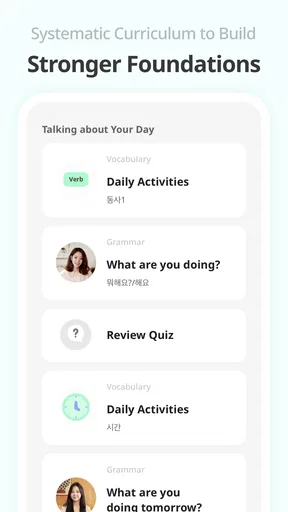
Yes, Teuida is highly suitable for beginners. The app offers structured courses that start with basic vocabulary and phrases, gradually progressing to more complex dialogues. The interactive nature of the lessons helps beginners build confidence in speaking and understanding the language from the start, making it user-friendly for new learners.
Does Teuida have a free version?
Teuida offers both free and premium versions. The free version provides access to basic lessons and practice exercises, which are sufficient for getting started. However, for a more comprehensive experience that includes advanced lessons and personalized feedback, users can opt for the premium subscription. This allows access to the full range of features the app offers.
Can I track my progress with Teuida?
Yes, Teuida includes a progress tracking feature. Users can monitor their advancement through various levels and lessons. The app provides feedback on completed exercises and offers recommendations for areas needing improvement. This feature is beneficial for maintaining motivation and ensuring steady progress in language learning.


